 2
2
 0
0
Read Time9 Minute, 41 Second
Contents
Introduction
As cloud environments grow in scale and complexity, developers play a critical role in ensuring that AWS networks remain secure, efficient, and resilient. In this final installment of the AWS Networking for Developers series, we’ll focus on the practical best practices that help you design, deploy, and maintain robust cloud architectures. From securing VPC configurations and managing network access to optimizing performance and cost, these principles will guide you in building cloud-native applications that scale seamlessly while maintaining compliance and operational excellence.
Articles in this series
Before reading this article, I recommend that you read the previous articles in this series to understand the basics of AWS Networking.
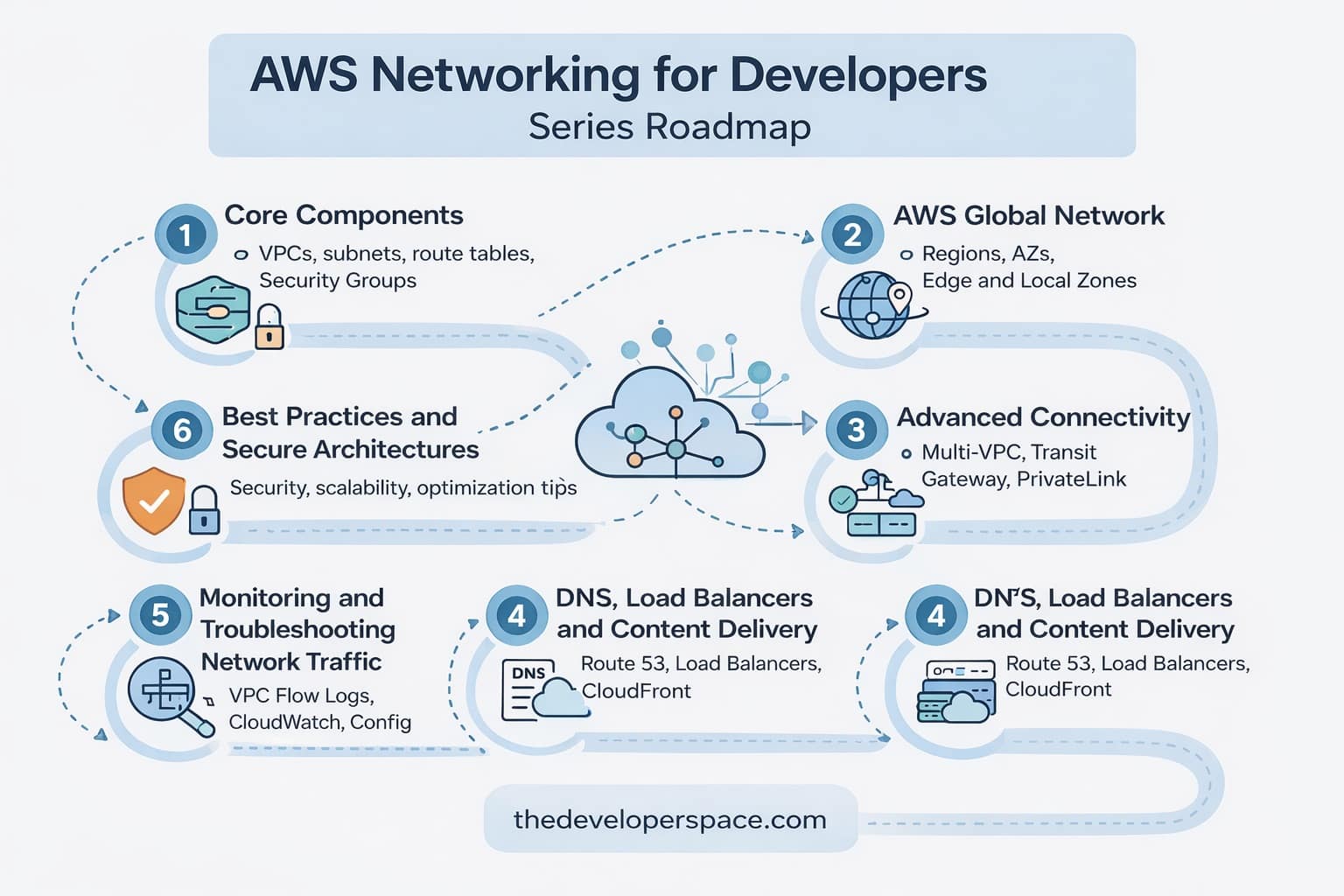
 AWS Networking for Developers: Part 1 – Core Components
AWS Networking for Developers: Part 2 – AWS Global Network
AWS Networking for Developers: Part 3 – Advanced Connectivity
AWS Networking for Developers: Part 4 – DNS, Load Balancers and Content Delivery
AWS Networking for Developers: Part 5 – Monitoring and Troubleshooting Tools
 AWS Networking for Developers: Part 6 – Developer Best Practices
1. Designing for Security First
1.1. Implement the Principle of Least Privilege
The principle of least privilege (PoLP) is a cornerstone of cloud security. Every user, role, and service should only have the permissions absolutely necessary to perform their function.
- Use IAM roles rather than static access keys.
- Apply fine-grained permissions to security groups and NACLs—avoid using
0.0.0.0/0for inbound traffic unless explicitly needed. - Restrict access to management ports (SSH, RDP) using bastion hosts or Session Manager instead of public endpoints.
- Restrict Internet Access: Avoid public IPs for internal services. Use NAT Gateways or AWS PrivateLink for private access to AWS services.
1.2. Use Network Segmentation
Segmenting your AWS network reduces the blast radius in case of a breach and improves traffic control.
- Use Public and Private Subnets: Isolate front-end and backend resources. Place databases and sensitive services in private subnets and expose only what’s necessary in public subnets.
- Isolate Environments: Use separate VPCs or Subnet CIDRs for dev, test, and prod environments to reduce blast radius and enhance governance.
- Tag Everything: Use consistent tagging for subnets, route tables, security groups, etc., for better cost allocation and maintainability.
- Apply NACLs to restrict subnet-level access and security groups for instance-level filtering.
1.3. Enable Encryption Everywhere
Data protection must extend beyond the application layer.
- Use AWS Certificate Manager (ACM) to manage SSL/TLS certificates easily.
- Enable encryption at rest using KMS-managed keys for S3, EBS, and RDS.
- Implement TLS 1.2+ for all services communicating across the network.
2. Building for Scalability, High Availability and Fault Tolerance
2.1. Use Load Balancers Strategically
AWS offers different load balancers for different workloads:
- Application Load Balancer (ALB) for HTTP/HTTPS traffic and advanced routing.
- Network Load Balancer (NLB) for TCP/UDP workloads requiring high throughput and low latency.
- Gateway Load Balancer (GLB) for deploying and scaling third-party virtual appliances like firewalls and intrusion detection systems.
Enable cross-zone load balancing to distribute traffic evenly across multiple Availability Zones, ensuring high availability and better user experience.
2.2. Design Multi-AZ and Multi-Region Architectures
High availability (HA) starts with redundancy.
- Deploy instances across multiple Availability Zones (AZs) to handle local failures.
- Use Route 53 with latency-based or geolocation routing to direct users to the nearest region for faster response times.
- Store data in Amazon S3 with cross-region replication for disaster recovery.
- Redundant NAT Gateways: For private subnets, deploy a NAT Gateway in each AZ to avoid single points of failure and ensure AZ independence.
- Avoid Overlapping CIDRs: Plan and reserve non-overlapping IP address ranges in all VPCs to simplify routing and peering.
- Consider VPC Lattice: For service-to-service communication with fine-grained policies across VPCs, look into VPC Lattice (as it matures).
2.3. Automate Scaling
Dynamic scaling ensures performance consistency under variable load.
- Use Auto Scaling groups with target tracking policies to maintain optimal performance.
- Combine with CloudWatch metrics to trigger scaling events based on traffic or CPU utilization.
- For serverless workloads, rely on AWS Lambda and Amazon DynamoDB auto-scaling for effortless elasticity.
- Use Transit Gateway for Scalability: Replace complex mesh peering networks with a central TGW in multi-VPC environments.
3. Monitoring, Logging, and Compliance
3.1. Implement End-to-End Visibility
You can’t manage what you can’t see. Implement full visibility into your network’s operations.
- Use VPC Flow Logs to capture IP traffic information and identify anomalies and misconfigurations.
- Integrate AWS CloudWatch and CloudTrail to track metrics, events, and API calls.
- Use AWS X-Ray to trace end-to-end request latency for distributed applications.
3.2. Use AWS Config for Continuous Compliance
AWS Config continuously evaluates the configuration of your AWS resources.
- Detect deviations from your organization’s network policies (like open ports or public subnets).
- Automate remediation using AWS Systems Manager Automation Documents.
- Generate configuration compliance reports for audits and governance.
3.3. Embrace Centralized Logging
Managing logs across multiple accounts and regions can be complex.
- Use AWS CloudWatch Logs Insights for querying and analyzing log data.
- Centralize logs in a dedicated logging account using AWS Organizations.
- For deep search and analytics, integrate Amazon OpenSearch Service with CloudWatch.
- Troubleshoot connectivity problems quickly using the Reachability Analyzer’s hop-by-hop analysis.
4. Optimizing Performance and Cost
4.1. Use Caching and CDNs
A content delivery network (CDN) like Amazon CloudFront improves global performance by caching content closer to users.
- Distribute static assets (images, scripts, stylesheets) through CloudFront edge locations.
- Use Lambda@Edge or CloudFront Functions for custom request and response handling.
- Integrate AWS Shield and AWS WAF for additional protection against DDoS attacks.
4.2. Right-Size Network Resources
Cost optimization starts with the right architecture:
- Choose the Right NAT Gateway Strategy: NAT Gateways are charged by data processed—group private subnets by AZ to minimize redundancy and cost.
- Minimize Cross-AZ Traffic: Data transfer across AZs incurs charges; where possible, colocate dependent services in the same AZ.
- Use Interface Endpoints (PrivateLink): Access AWS services like S3 and DynamoDB privately without traversing NAT Gateways, saving on bandwidth costs.
- Analyze data transfer costs, for example, using VPC Endpoints for S3 and DynamoDB can avoid NAT Gateway charges.
- Use Gateway Endpoints for private S3 access.
4.3. Review and Optimize Regularly
Networks evolve, and so should your configurations.
- Schedule periodic architecture reviews using the AWS Well-Architected Tool.
- Leverage AWS Trusted Advisor for insights into cost optimization, security, and performance.
- Implement a continuous improvement loop—measure, review, and refine.
- Allocate CIDRs Generously: Don’t be too conservative with IP blocks. It’s difficult to expand IP ranges later without downtime or migration.
- Choose IPv6 if Needed: For IoT or large-scale public-facing applications, IPv6 can solve address exhaustion issues and simplify public access.
- Review Quotas: Each VPC has limits on route tables, NAT gateways, and endpoints. Monitor usage and request quota increases proactively.
5. Document and Educate
5.1 Train Dev Teams
Make sure developers understand basics like subnet placement, security groups, and flow logs to speed up development cycles and reduce support overhead.
5.2 Maintain Architecture Diagrams
Keep your VPC architecture up to date and accessible to team members for onboarding and debugging.
Wrapping Up
As cloud environments scale and become more distributed, AWS networking best practices become critical for maintaining performance, security, and efficiency. By designing with security in mind, leveraging automation and monitoring tools, and regularly optimizing your infrastructure, developers can build networks that are not only resilient but also cost-effective and future-proof.
Networking is the backbone of your application’s reliability and performance. As a developer, gaining fluency in AWS networking allows you to:
- Reduce build time by avoiding network related issues during development.
- Build more secure systems
- Minimize latency between component communications by choosing the right networking components and configurations specific to the use case.
- Reduce downtime and misconfigurations
- Collaborate better with DevOps and infra teams
Start small, launch a VPC with public and private subnets, deploy an EC2 or Lambda, and watch your networking knowledge grow.
Advanced networking services in AWS open the doors to hybrid cloud, cross-account communication, and secure service integration without exposing data to the public internet. By strategically using NAT Gateways, PrivateLink, Transit Gateways, and VPC Peering, developers can build scalable, secure, and highly interconnected systems. With both foundational and advanced networking concepts in your toolkit, you’re now well-prepared to design and troubleshoot sophisticated AWS environments with confidence.
This final part of the AWS Networking for Developers series brings together everything, from the fundamentals of VPCs and routing to advanced monitoring and optimization, helping you create AWS network architectures that are both secure and scalable by design.
[…] AWS Networking for Developers: Part 6 – Developer Best Practices […]
[…] AWS Networking for Developers: Part 6 – Developer Best Practices […]
[…] AWS Networking for Developers: Part 6 – Developer Best Practices […]
[…] 🔗 https://thedeveloperspace.com/aws-networking-developer-best-practices/ […]