 2
2
 0
0
Read Time21 Minute, 24 Second
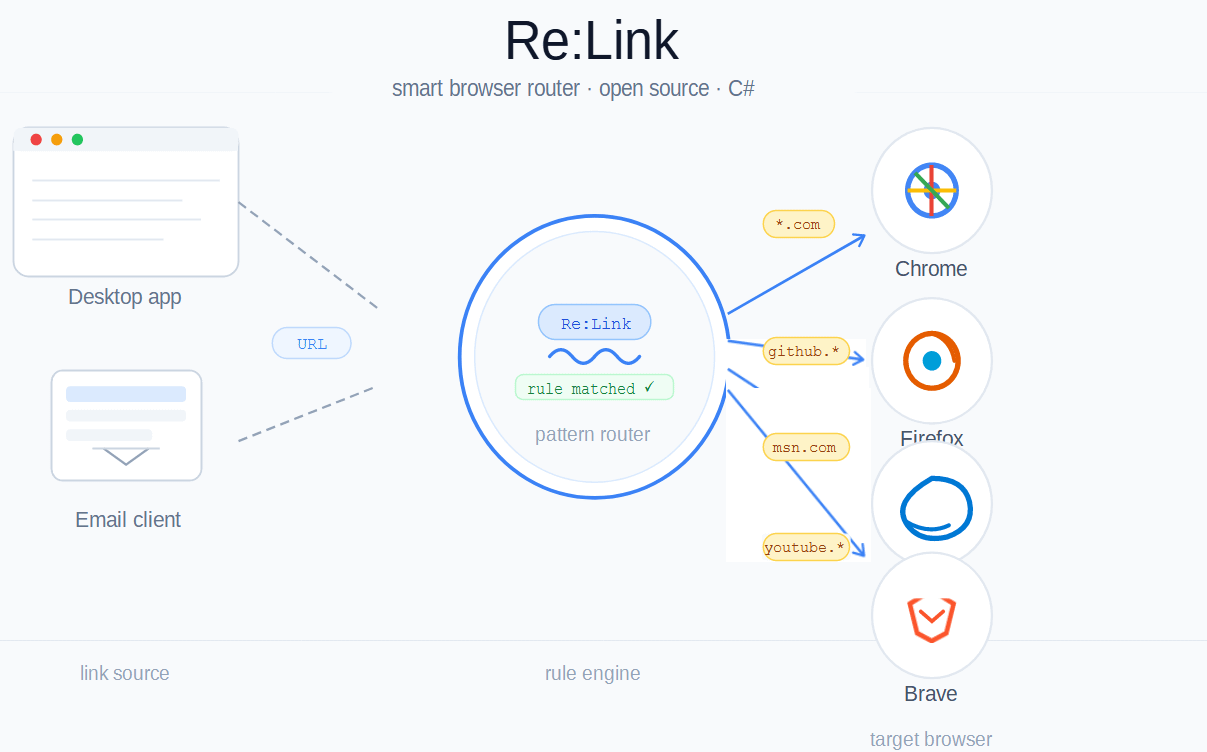
Have you ever wished you could automatically open links from your email client in different browsers depending on what the link points to? That’s exactly what Re:Link does. It registers itself as a “browser” with the OS, intercepts every link click from email clients and other desktop apps, evaluates your custom rules, and launches the correct browser, all in a fraction of a second.
In this article, we’ll walk through how ReLink is built: how the code is structured, the design patterns it employs, and the engineering decisions that make it clean and extensible.
Contents
The Big Picture
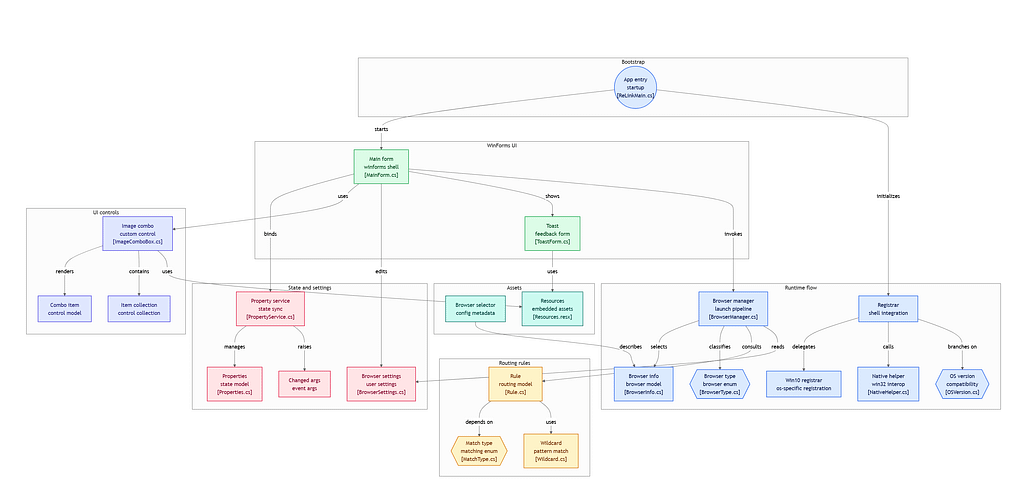
ReLink is a C# Windows Forms application. Its architecture can be summarized in three responsibilities:
- OS Registration — Register itself with Windows as a browser so it receives link-open requests.
- URL Routing — Match an incoming URL against user-defined rules to decide which browser to launch.
- Settings UI — Let the user manage rules, set a default browser, and configure preferences.
The project is organized into clearly named folders (Browser, Rules, Config, PropertyService, Settings, ImageComboBox), each owning a single concern. This is the Single Responsibility Principle (SRP) applied at the module level, before we even look at individual classes.
1. Entry Point: Clean Separation of Startup Concerns (ReLinkMain.cs)
The application entry point in ReLinkMain.cs is a masterclass in keeping Main() simple:
[STAThread]
static void Main(string[] args) {
    try {
        var osVersion = NativeHelper.GetOSVersion();
        if (osVersion == OSVersion.Win8 || osVersion == OSVersion.Win10) {
            Run(args);
        } else {
            ToastForm.ShowToast($"{Application.ProductName} runs on Windows 8 and later...");
        }
    } catch (Exception ex) {
        HandleMainException(ex);
    }
}
Main does exactly three things: validate the environment, delegate to Run, or surface an error. There are no business-logic decisions here; that’s the job of Run and HandleArgs.
Dual-Mode Operation
One of the smartest decisions in the design is how arguments are handled:
static void Run(string[] args) {
    InitializeServices();
    if (args.Length > 0) {
        HandleArgs(args);
        return;
    }
    Application.EnableVisualStyles();
    MainForm mainForm = MainForm.Instance;
    Application.Run(mainForm);
}
The same binary runs in two completely different modes:
- No arguments — the UI launches so the user can manage rules.
- With arguments — it acts silently, either registering or unregistering ReLink as a browser in the system (requires admin privileges) or routing the URL and exiting immediately, based on arguments passed.
This means the OS can call the same executable to open a link (eg: relink.exe https://github.com) as the user runs to configure it, with no separate daemon needed. This pattern is common in CLI tools and installers, and it keeps deployment simple.
Lifecycle Management
Services are initialized before anything else and saved on exit via event handlers:
Application.ApplicationExit += new EventHandler(Application_ApplicationExit);

private static void Application_ApplicationExit(object sender, EventArgs e) {
    ShutdownServices();
}
Registering an ApplicationExit handler (rather than putting cleanup in a finally block) means settings are saved regardless of how the application exits: through the UI, through a menu item, or through an unhandled exception. This is the Observer pattern applied to the application lifecycle.
2. The Singleton Pattern: MainForm.Instance
The main settings window uses a static Singleton:
public partial class MainForm : Form {
    static MainForm _instance;

    static MainForm() {
        _instance = new MainForm();
    }

    static internal MainForm Instance {
        get { return _instance; }
    }
}
A static constructor initializes the instance once, guaranteeing thread-safe construction without locks (a well-known C# idiom). For a desktop settings window there should only ever be one instance, and this pattern enforces that constraint at compile time rather than relying on calling code to “just not open it twice.”
3. The Command Pattern: Argument Handling
HandleArgs maps command-line arguments to actions with no branching logic embedded in the individual handlers:
static void HandleArgs(string[] args) {
    foreach (string arg in args) {
        if (string.Equals(arg, ARG_REGISTER, StringComparison.OrdinalIgnoreCase)) {
            BrowserManager.RegisterRelinkAsBrowser();
        } else if (string.Equals(arg, ARG_UNREGISTER, StringComparison.OrdinalIgnoreCase)) {
            BrowserManager.UnregisterRelinkAsBrowser();
        } else {
            BrowserInfo browser = BrowserManager.LaunchUrl(arg);
            // Show toast notification...
        }
    }
}
The argument strings are defined as constants (ARG_REGISTER, ARG_UNREGISTER), not magic strings scattered through the code. The case-insensitive comparison (StringComparison.OrdinalIgnoreCase) means --Register and --register both work. These are small details that add up to a robust command-line interface.
4. BrowserManager: The Facade Pattern
BrowserManager is the heart of ReLink. It acts as a Facade, a single unified interface over everything browser-related:
- Discovering installed browsers on the system
- Registering and unregistering ReLink with the Windows registry
- Setting ReLink as the OS default browser
- Matching a URL against rules and launching the appropriate browser
Callers in MainForm and ReLinkMain never need to know about registry keys, process launching, or rule evaluation. They just call:
BrowserInfo browser = BrowserManager.LaunchUrl(arg);
This encapsulation means you could swap out the underlying browser discovery mechanism (say, reading from a config file instead of the registry) without changing a single line in MainForm or ReLinkMain. That’s the Open/Closed Principle in action: open for extension, closed for modification.
5. Rule Matching: Strategy Pattern
Rules are stored with a MatchType enum, evidenced by the UI populating its dropdown directly from enum names:
private void InitMatchTypesList() {
    cboMatchType.Items.Clear();
    foreach (string name in Enum.GetNames(typeof(MatchType))) {
        cboMatchType.Items.Add(new ImageComboBoxItem() { Text = name });
    }
}
This hints at a Strategy pattern for URL matching: each MatchType value (e.g., Contains, StartsWith, Regex) represents an interchangeable algorithm for deciding whether a rule applies to a URL. The Rule class hosts the logic of how a match is resolved based on the MatchType enum
internal bool IsMatch(string matchUrl) {
    switch (MatchType) {
        case MatchType.Contains:
            return (matchUrl.Contains(Url));
        case MatchType.StartsWith:
            return (matchUrl.StartsWith(Url));
        case MatchType.ExactMatch:
            return (matchUrl.Equals(Url, StringComparison.OrdinalIgnoreCase));
        case MatchType.Wildcard:
            return Wildcard.IsMatch(matchUrl, Url);
        case MatchType.Regex:
            return Regex.IsMatch(matchUrl, Url, RegexOptions.IgnoreCase);
        default:
            return false;
    }
}
Adding a new match type is a matter of adding a value to the enum and implementing the corresponding logic; the UI and rule storage automatically pick it up because they both derive from the same source of truth.
Rule Priority by Position
Rules are ordered. The UI has explicit Move Up / Move Down buttons, and row numbers are maintained:
private void RenumberGridRows() {
    for (int r = 0; r < grdRules.Rows.Count; r++) {
        grdRules.Rows[r].Cells[0].Value = r;
    }
}
This gives the user a first-match-wins semantic: the rule at the top of the list takes precedence. This is how most routing systems (URL routers, firewall rules, CSS selectors) work, and it’s a model users already understand intuitively. This provides a consistent app behavior that is easier to predict and diagnose.
6. PropertyService: Generic Settings Persistence
The PropertyService module handles saving and loading configuration. Its initialization call reveals a clean separation:
PropertyService.InitializeService(
    configDirectory,                                      // where to write user data
    Path.Combine(AppDomain.CurrentDomain.BaseDirectory, "data"), // defaults shipped with the app
    applicationName
);
PropertyService.Load();
Two data directories are separated by design: the application’s shipped defaults and the user’s overrides. This pattern is common in IDEs and editors — ship sensible defaults, let the user override, never overwrite the user’s data on reinstall. The PropertyService is a Service Locator that other parts of the code (BrowserSettings) call without needing to know where the configuration file lives.
7. Notification System: ToastForm
The toast notification window is a lightweight but thoughtful piece:
internal static void ShowToast(string message, bool isDialog) {
    if (isDialog && !BrowserSettings.ShowNotifications) {
        return;
    }
    ToastForm toast = new ToastForm();
    toast.lblMessage.Text = message;
    toast.tmrClose.Interval = DURATION * 1000;
    toast.tmrClose.Start();
    toast.TopMost = true;

    int screenWidth = Screen.PrimaryScreen.WorkingArea.Width;
    int screenHeight = Screen.PrimaryScreen.WorkingArea.Height;
    toast.Size = new Size(screenWidth / 5, screenHeight / 5);
    toast.Location = new Point(
        (screenWidth - toast.Size.Width) - 10,
        (screenHeight - toast.Size.Height) - 10
    );

    if (isDialog) {
        toast.ShowDialog();
    } else {
        toast.Show();
    }
}
Several good practices are at work here. User preference is respected: if the user has disabled notifications, toasts that are informational (isDialog: true) are suppressed before the window is even created, with no wasted allocation. The toast is sized as a fraction of the screen (screenWidth / 5), so it looks right on both a 1080p laptop and a 4K display. It is always positioned in the bottom-right corner, mirroring the convention established by OS notification systems. A single bool isDialog parameter controls whether the toast blocks the calling code or not, which is critical because the URL-routing path (HandleArgs) runs without a message loop and needs a ShowDialog call to function correctly.
8. UI Patterns in MainForm
Populating the Browser List with Icons
The browser dropdown uses a custom ImageComboBox that shows each browser’s actual icon alongside its name:
private void InitBrowserList(ImageComboBox.ImageComboBox dropdownBox) {
    BrowserInfo[] browsers = BrowserManager.Browsers;
    foreach (BrowserInfo browser in browsers) {
        imlBrowsers.Images.Add(browser.Name, browser.Icon);
        dropdownBox.Items.Add(
            new ImageComboBoxItem(imlBrowsers.Images.IndexOfKey(browser.Name), browser.Name, 0)
        );
    }
}
Rather than hard-coding browser names and icons, ReLink discovers them at runtime from the OS. This means it automatically supports any browser the user has installed — Brave, Vivaldi, Arc, or anything released after the app was written — without requiring an update.
Smart Defaults with Fallbacks
When pre-selecting a browser in the dropdown, the code tries Edge first, then falls back to Edge Legacy, then to whatever is first:
int indexOfEdge = dropdownBox.FindStringExact("Edge");
if (indexOfEdge > 0) {
    dropdownBox.SelectedIndex = indexOfEdge;
} else {
    int indexOfEdgeLegacy = dropdownBox.FindStringExact("Edge (Legacy)");
    if (indexOfEdgeLegacy > 0) {
        dropdownBox.SelectedIndex = indexOfEdgeLegacy;
    } else {
        dropdownBox.SelectedIndex = 0;
    }
}
This is defensive programming: always have a sensible fallback, never leave the UI in an invalid state.
Graceful Rule Migration
When loading saved rules, the code handles the case where an old rule stores a browser identifier that no longer matches the current naming convention:
if (BrowserManager.Browsers.Count(n => n.Name.Equals(browserName, ...)) == 0) {
    BrowserType browserType;
    string browserNewName;
    BrowserManager.GetBrowserInfoFromAppId(browserName, out browserType, out browserNewName);
    browserName = browserNewName;
}
This is forward compatibility built into the data layer. Users who upgrade ReLink don’t lose their rules; the app silently migrates them on load. This kind of attention to upgrade paths is often skipped in small projects but is hugely important for user trust.
Thread-Safe UI Updates
When toggling the “use default browser for all links” checkbox, the grid update is wrapped in SuspendLayout / ResumeLayout:
try {
    grdRules.SuspendLayout();
    grdRules.BackgroundColor = backgroundColor;
    foreach (DataGridViewRow row in grdRules.Rows) {
        row.DefaultCellStyle.BackColor = backgroundColor;
    }
} finally {
    grdRules.ResumeLayout();
}
Suspending layout prevents the grid from repainting after every single row update, which would cause visible flickering. The finally block guarantees ResumeLayout is called even if something throws, preventing the UI from being stuck in a suspended state.
9. Sample Rules at First run
First-time users see a set of pre-populated sample rules covering common sites:
private void InitSampleRules() {
    List<Rule> rules = new List<Rule>() {
        new Rule() { ..., Url = "https://google.com" },
        new Rule() { ..., Url = "https://mail.google.com/mail" },
        new Rule() { ..., Url = "https://github.com" },
        // ...
    };
}
This is excellent UX engineering disguised as code. An empty screen with no rules would leave new users wondering what to do. Sensible defaults communicate the app’s purpose immediately and give users a working configuration to edit rather than one to create from scratch.
10. Defensive Error Handling
Across the codebase, operations that deal with user data or the file system are wrapped defensively. The LoadSavedRules and InitSampleRules methods catch all exceptions silently. If saved rules are malformed or the file is missing, the app continues with an empty list. This is appropriate for a UI startup path: better to show the user a blank slate than crash on launch because a config file was manually edited incorrectly.
For the application’s critical path (the Main entry point), exceptions are caught and shown as a dialog. For the URL-routing path (HandleArgs), any exception that escapes is caught at the top level, so the app never silently fails to open a link without some notification.
11. Missed Patterns and Areas for Improvement
No codebase is perfect, and an honest engineering analysis should cover what could be done differently just as much as what was done well. The following observations are framed constructively. ReLink is a small, focused tool and these are natural next steps for anyone who wants to extend or harden it.
11.1 BrowserManager Violates the Single Responsibility Principle
The BrowserManager class is the most powerful class in the codebase and also its most overloaded one. It handles browser discovery, Windows registry manipulation, default-browser registration, URL sanitization, rule matching, and process launching, all in one place. The Facade pattern works well when the facade is a thin coordinator over dedicated sub-components, but here BrowserManager appears to be both the facade and the implementation.
A cleaner split would be:
BrowserDiscovery— reads installed browsers from the OSBrowserRegistry— handles Windows registry read/write for registrationUrlRouter— takes a URL and a rule list, returns the targetBrowserInfoBrowserLauncher— spawns the process
BrowserManager could then be the thin coordinator it was always meant to be. This decomposition also makes unit testing each concern independently much more tractable.
11.2 No Unit Tests
The repository contains no test project. This isn’t unusual for a solo utility app, but the URL routing logic (matching a URL against an ordered list of rules with different MatchType strategies) is precisely the kind of logic that benefits most from automated tests. A bad regex rule, a precedence bug, or a URL sanitization edge case could silently route a user to the wrong browser with no obvious error.
Adding an xUnit or NUnit project and testing the UrlRouter (once extracted from BrowserManager) would give contributors the confidence to modify matching logic without fear of regression. A handful of tests covering Contains, StartsWith, Regex, and the fallback path would cover the critical cases.
11.3 Silent Catch-All Exception Handling
Several methods swallow all exceptions with an empty catch block:
private void LoadSavedRules() {
    try {
        // ... load and parse rules
    } catch {
        // silently ignored
    }
}

private void InitSampleRules() {
    try {
        // ...
    } catch {
        // silently ignored
    }
}
Swallowing exceptions makes debugging genuinely difficult. If LoadSavedRules fails because a settings file was written with an incompatible schema, the user just sees an empty rules list with no indication that something went wrong. A better approach for a desktop app is to log the exception (even to a simple relink-errors.log in the app data directory) and optionally show a non-blocking notice to the user. The exception should still not crash the app, but it should not disappear without a trace either.
11.4 The isDialog Boolean Trap
The ToastForm.ShowToast method takes an isDialog boolean parameter:
internal static void ShowToast(string message, bool isDialog)
This is a classic boolean parameter smell, a flag argument that controls fundamentally different behavior inside a single method. The two behaviors here are: show a transient notification (non-modal), and show a blocking confirmation (modal). These are different enough to warrant two separate, clearly named methods:
internal static void ShowNotification(string message) {

}

internal static void ShowBlockingMessage(string message) {

}
This makes call sites self-documenting. Reading ToastForm.ShowToast(message, true) tells you nothing about what true means without looking at the method signature. Reading ToastForm.ShowBlockingMessage(message) is unambiguous.
11.5 MainForm Is Doing Too Much
MainForm.cs is 380 lines of code that handles rule display, rule editing, rule persistence, browser list initialization, onboarding, default browser checks, and notification display. The Windows Forms pattern encourages this because the designer generates code in the same class, but the logic in MainForm should be extracted into a presenter or view-model.
A lightweight Model-View-Presenter (MVP) structure would help:
MainFormhandles UI events and renders state (the View)RulesPresenterowns rule CRUD operations, loading, saving, and reordering (the Presenter)BrowserSettingsremains the data model (the Model)
This would make MainForm much smaller and easier to follow, and would make RulesPresenter independently testable.
11.6 Hardcoded OS Version Check
The OS version gate in ReLinkMain checks for Win8 and Win10 explicitly:
if (osVersion == OSVersion.Win8 || osVersion == OSVersion.Win10) {
    Run(args);
}
This pattern will silently block the app from running on Windows 11 (or any future version) if NativeHelper.GetOSVersion() doesn’t map Windows 11 to Win10. The safer approach is to express the constraint as a minimum version check:
if (osVersion >= OSVersion.Win8) {
    Run(args);
}
This is an allowlist-by-version-threshold rather than an exact-match allowlist, and it future-proofs the gate without requiring a code change for every new Windows release.
11.7 No Dependency Injection
Services like PropertyService and BrowserManager are accessed as static singletons throughout the codebase. Static access is convenient but it tightly couples every consumer to a specific implementation. If you ever wanted to swap PropertyService for a different persistence backend (say, JSON instead of the current format, or a cloud-synced store), you’d need to change every call site.
Introducing even a minimal Dependency Injection approach (passing an IPropertyService or IBrowserRepository interface into constructors) would decouple the components and make the codebase significantly easier to extend and test. For a Windows Forms app, a lightweight container like Microsoft.Extensions.DependencyInjection is a low-friction addition.
11.8 No Async on the URL Launch Path
When HandleArgs calls BrowserManager.LaunchUrl(arg) and then ToastForm.ShowToast(...), both calls happen synchronously on the same thread. If browser discovery or process launching ever becomes slow (e.g., due to a slow registry read on a loaded machine), the user would experience a visible delay before their link opens. Since this is the app’s hot path (the action it performs on every single link click), it would benefit from async/await to keep the startup thread unblocked and the toast responsive.
Summary of Patterns and Practices
| Pattern / Practice | Where It Appears |
|---|---|
| Singleton | MainForm.Instance |
| Facade | BrowserManager |
| Strategy | MatchType enum for URL matching |
| Observer | Application.ApplicationExit event |
| Dual-mode CLI / GUI | ReLinkMain.Run argument check |
| Single Responsibility | Folder-level module separation |
| Open/Closed Principle | Runtime browser discovery |
| Defensive programming | Fallback browser selection, silent rule migration |
| Graceful onboarding | Sample rules for first-run |
| Responsive UI | Toast sizing relative to screen dimensions |
| Layout performance | SuspendLayout / ResumeLayout pattern |
| Improvement Area | Issue | Suggested Fix |
|---|---|---|
| BrowserManager scope | Does too many things | Split into BrowserDiscovery, UrlRouter, BrowserLauncher |
| No tests | Routing logic untested | Add xUnit project, test MatchType strategies |
| Silent exceptions | Errors disappear | Log to file; show non-blocking notice |
| Boolean parameter | isDialog obscures intent | Replace with ShowNotification / ShowBlockingMessage |
| MainForm size | 380 lines of mixed concerns | Extract RulesPresenter (MVP pattern) |
| OS version check | Blocks future Windows versions | Change to minimum-version comparison |
| Static service access | Hard to test or swap | Introduce IPropertyService / IBrowserRepository interfaces |
| Synchronous launch path | Potential blocking on hot path | Apply async/await to LaunchUrl and toast display |
Conclusion
ReLink demonstrates that a focused, single-purpose utility can be built with real care. It consistently applies patterns that make it readable and user-friendly: clean module boundaries, thoughtful onboarding, silent rule migration on upgrade, and OS-aware browser discovery. The areas for improvement are not flaws that undermine the app. It works well and has done so across multiple releases. They are the natural next layer of maturity for a project that wants to grow: better testability, cleaner component boundaries, and a more robust error-surfacing strategy.
For a solo developer project, this is a high bar. The improvement suggestions above are offered in the spirit of the open-source ethos the project embodies. If any of them resonate with you, the repository is open for contributions.
Further Reading
- Design Patterns in C# — Advanced Examples and Real-World Use Cases — a practical walk-through of Singleton, Factory, and other patterns with production-oriented C# code samples.
- Facade Design Pattern in C# — the Refactoring Guru reference for the Facade pattern, with a runnable C# example and a clear explanation of when the pattern becomes a liability.
- Mastering SOLID Principles in C# — covers all five SOLID principles with real-world .NET trade-offs, useful context for the SRP and OCP points raised in this article.
- Mastering C# Design Patterns: Singleton, Factory, and Observer — a focused DEV Community article on three of the patterns ReLink uses, with side-by-side before-and-after code.


[…] How ReLink Works: A Deep Dive into Design Patterns and Best Practices […]