
 5
5
 0
0
Read Time9 Minute, 39 Second
In our previous articles, we explored the basics of SQL and moved on to more advanced queries. Now, it’s time to dive deeper into one of the most powerful features of SQL: JOINS. Understanding how to join tables is essential for retrieving meaningful data from relational databases. In this guide, we’ll cover different types of JOINs with easy-to-understand explanations and examples.
Contents
Articles in the Series
Before reading this article, I recommend that you read the previous articles in this series to understand the basics and to set up the Sample database that we’ll be using for the examples in the article.
 SQL for Beginners: Learn the Basics with Examples
SQL for Beginners – Part 2: SELECT Commands with Examples
 SQL for Beginners – Part 3: JOINS
SQL for Beginners – Part 4: Mastering Subqueries
Setting up the Sample Database
The examples in these article series were created using PostgreSQL (Database) and DbStudio (IDE). However, you can try out these examples in any Relational Database. You may have to tweak the syntax to make it work with your target database platform.
We created the Users table in the previous article. We’ll reuse this table and create a new Orders table that stores the orders for the user.
All code samples in this article can be accessed here: https://github.com/The-Developer-Space/CodeSamples/blob/main/SQL_for_Beginners
Users Table
The script for the Users table can be found here.
| UserID | FirstName | LastName | |
|---|---|---|---|
| 1 | John | Doe | john.doe@example.com |
| 2 | Jane | Smith | jane.smith@example.com |
| 3 | Alice | Johnson | alice.johnson@example.com |
| 4 | Bob | Brown | bob.brown@example.com |
Orders Table
This table has intentionally been made simple and denormalized for explaining joins in this article. Ideally, we should have a separate Products table and store the ProductID in the Orders table. Orders without a UserID wouldn’t exist in a real-world scenario, but it’s shown here as an example to understand how RIGHT JOIN works.
--Create the Orders table
CREATE TABLE Orders (
    OrderID BIGSERIAL PRIMARY KEY,
    UserID INT,
    Product VARCHAR(50),
    Amount DECIMAL(10,2)
);

--Insert Sample Orders
INSERT INTO Orders
    (UserID, Product, Amount)
VALUES
((SELECT UserID FROM Users WHERE FirstName='John' AND LastName='Doe'), 'Keyboard', 50),
((SELECT UserID FROM Users WHERE FirstName='Jane' AND LastName='Smith'), 'Mouse', 30),
((SELECT UserID FROM Users WHERE FirstName='John' AND LastName='Doe'), 'Monitor', 150),
((SELECT UserID FROM Users WHERE FirstName='Bob' AND LastName='Brown'), 'Webcam', 70),
((SELECT UserID FROM Users WHERE FirstName='Olivia' AND LastName='Martin'), 'Laptop', 900),
((SELECT UserID FROM Users WHERE FirstName='James' AND LastName='King'), 'Desktop', 1200),
((SELECT UserID FROM Users WHERE FirstName='Amelia' AND LastName='Gonzalez'), 'Digicam', 200),
((SELECT UserID FROM Users WHERE FirstName='Amelia' AND LastName='Gonzalez'), 'Tripod', 30),
(NULL, 'External Drive', 100),
(9999, 'Speaker', 50),
(NULL, 'Microphone', 25);
Once created, you should see the table like this:
SELECT * FROM Orders;
| OrderID | UserID | Product | Amount |
|---|---|---|---|
| 1 | 1 | Keyboard | 50 |
| 2 | 2 | Mouse | 30 |
| 3 | 1 | Monitor | 150 |
| 4 | 4 | Webcam | 70 |
| 5 | 11 | Laptop | 900 |
| 6 | 18 | Desktop | 1200 |
| 7 | 23 | Digicam | 200 |
| 8 | 23 | Tripod | 30 |
| 9 | External Drive | 100 | |
| 10 | 9999 | Speaker | 50 |
| 11 | Microphone | 25 |
What is a JOIN?
In SQL, a JOIN clause is used to combine rows from two or more tables based on a related column between them. Since relational databases are designed to store data in multiple tables, JOINs help bring that data together to form a complete picture. JOINs help us normalize databases and keep only the data that is required in each individual tables without the need to duplicate them.
The examples in this article discuss joins between two tables. However, you can join as many tables as you want in a single query.
Syntax of JOIN
The basic format begins with a SELECT statement, specifying the columns you want to retrieve, followed by the FROM clause naming the primary table. Then, you use a specific JOIN keyword—such as INNER JOIN, LEFT JOIN, RIGHT JOIN, or FULL JOIN—to indicate the type of join operation. This is followed by the secondary table you want to join with, and an ON clause that defines the matching condition, usually involving primary and foreign keys (e.g., ON Users.UserID = Orders.UserID).
Types of JOIN
There are different types of joins that return different set of results. Let’s take a look at the most common ones
- INNER JOIN
- LEFT (OUTER) JOIN
- RIGHT (OUTER) JOIN
- FULL (OUTER) JOIN
- CROSS JOIN
INNER JOIN
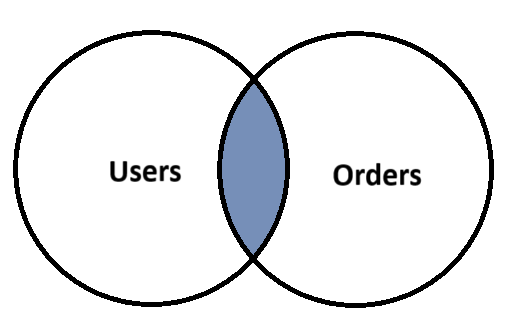
An INNER JOIN returns only the rows where there is a match in both tables based on the specified join condition. It’s the most commonly used join and is ideal when you want to retrieve data that exists in both related tables. For example, if you join a Users table with an Orders table using Users.UserID = Orders.UserID, the result will include only users who have written posts.
SELECT Users.FirstName, Users.LastName, Orders.Product, Orders.Amount
FROM Users
INNER JOIN Orders ON Users.UserID = Orders.UserID;
Output:
| FirstName | LastName | Product | Amount |
|---|---|---|---|
| John | Doe | Keyboard | 50 |
| Jane | Smith | Mouse | 30 |
| John | Doe | Monitor | 150 |
| Bob | Brown | Webcam | 70 |
| Olivia | Martin | Laptop | 900 |
| James | King | Desktop | 1200 |
| Amelia | Gonzalez | Digicam | 200 |
| Amelia | Gonzalez | Tripod | 30 |
Notice that not all Users are listed. Users without a UserID in the Orders table won’t be listed. And Orders with NULL UserIDs and UserIDs that are not in the Users table won’t be listed as well. For example, Order with UserID 9999 is not returned as the user with that ID does not exist in the Users table.
LEFT JOIN (or LEFT OUTER JOIN)
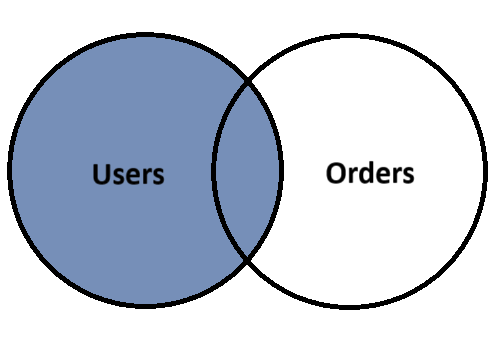
A LEFT JOIN returns all records from the left (first) table and the matching records from the right (second) table. If there is no match, NULL values are returned for columns from the right table. This is useful when you want to see all records from one table regardless of whether they have related records in the second table. For instance, showing all users along with any posts they may have created.
SELECT Users.FirstName, Users.LastName, Orders.Product, Orders.Amount
FROM Users
LEFT JOIN Orders ON Users.UserID = Orders.UserID;
Output:
| FirstName | LastName | Product | Amount |
|---|---|---|---|
| John | Doe | Keyboard | 50 |
| Jane | Smith | Mouse | 30 |
| John | Doe | Monitor | 150 |
| Bob | Brown | Webcam | 70 |
| Olivia | Martin | Laptop | 900 |
| James | King | Desktop | 1200 |
| Amelia | Gonzalez | Digicam | 200 |
| Amelia | Gonzalez | Tripod | 30 |
| Lucas | Scott | ||
| Grace | Carter | ||
| Ava | Young | ||
| Ethan | Clark | ||
| Daniel | Anderson | ||
| Sophia | Hall | ||
| Chloe | Lewis | ||
| Mia | Green | ||
| Emily | Davis | ||
| Isabella | Wright | ||
| Henry | Nelson | ||
| David | Moore | ||
| Michael | Miller | ||
| Noah | Allen | ||
| Alexander | Baker | ||
| Alice | Johnson | ||
| Liam | Walker | ||
| Laura | Taylor | ||
| Sarah | Wilson |
RIGHT JOIN (or RIGHT OUTER JOIN)
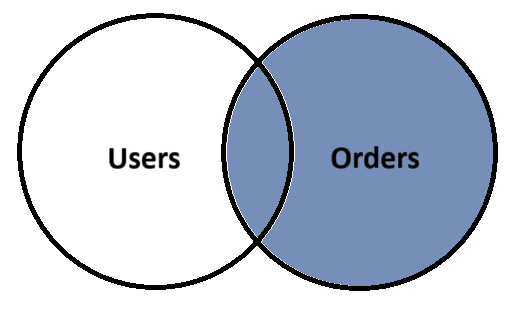
A RIGHT JOIN works the opposite of a LEFT JOIN: it returns all records from the right (second) table and any matching records from the left (first) table. If there is no match, NULLs are returned for the left table’s columns. It’s helpful when the focus is on the right table, such as retrieving all posts and the corresponding user information, even if some posts don’t have an associated user entry.
SELECT Users.FirstName, Users.LastName, Orders.Product, Orders.Amount
FROM Users
RIGHT JOIN Orders ON Users.UserID = Orders.UserID;
Output:
| FirstName | LastName | Product | Amount |
|---|---|---|---|
| John | Doe | Keyboard | 50 |
| Jane | Smith | Mouse | 30 |
| John | Doe | Monitor | 150 |
| Bob | Brown | Webcam | 70 |
| Olivia | Martin | Laptop | 900 |
| James | King | Desktop | 1200 |
| Amelia | Gonzalez | Digicam | 200 |
| Amelia | Gonzalez | Tripod | 30 |
| External Drive | 100 | ||
| Speaker | 50 | ||
| Microphone | 25 |
FULL JOIN (or FULL OUTER JOIN)
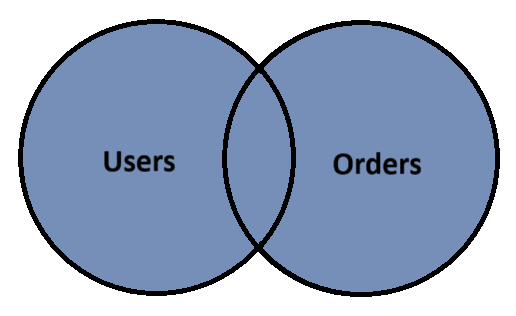
A FULL OUTER JOIN returns all records when there is a match in either the left or right table. If there is no match, the result will contain NULLs in the place of missing matches from either table. This join is ideal for capturing a complete picture of the data from both tables, including unmatched records on both sides. For example, it shows all users and all orders, regardless of whether they are linked.
SELECT Users.FirstName, Users.LastName, Orders.Product, Orders.Amount
FROM Users
FULL JOIN Orders ON Users.UserID = Orders.UserID;
Note that not all Databases support full joins and the syntax may vary significantly between different database platforms. If your database does not support the FULL JOIN keyword, the same results can be achieved using a UNION of LEFT and RIGHT JOINS.
A UNION simply returns the combined unique results of two separate SELECT statements.
SELECT Users.FirstName, Users.LastName, Orders.Product, Orders.Amount
FROM Users
LEFT JOIN Orders ON Users.UserID = Orders.UserID
UNION
SELECT Users.FirstName, Users.LastName, Orders.Product, Orders.Amount
FROM Users
RIGHT JOIN Orders ON Users.UserID = Orders.UserID;
Output:
| FirstName | LastName | Product | Amount |
|---|---|---|---|
| John | Doe | Keyboard | 50 |
| Amelia | Gonzalez | Tripod | 30 |
| Ethan | Clark | ||
| Noah | Allen | ||
| Speaker | 50 | ||
| Jane | Smith | Mouse | 30 |
| Lucas | Scott | ||
| Isabella | Wright | ||
| Henry | Nelson | ||
| Daniel | Anderson | ||
| Microphone | 25 | ||
| Sarah | Wilson | ||
| Amelia | Gonzalez | Digicam | 200 |
| Sophia | Hall | ||
| Grace | Carter | ||
| Olivia | Martin | Laptop | 900 |
| Ava | Young | ||
| John | Doe | Monitor | 150 |
| Bob | Brown | Webcam | 70 |
| David | Moore | ||
| Chloe | Lewis | ||
| Michael | Miller | ||
| Laura | Taylor | ||
| Alice | Johnson | ||
| Liam | Walker | ||
| Alexander | Baker | ||
| Mia | Green | ||
| Emily | Davis | ||
| James | King | Desktop | 1200 |
| External Drive | 100 |
CROSS JOIN
A CROSS JOIN returns the Cartesian product of two tables, meaning it pairs every row from the first table with every row from the second table. If the first table has m rows and the second table has n rows, the result will contain m × n rows. CROSS JOINs are rarely used in typical queries unless you specifically need all possible combinations—for example, generating a list of every possible product and color combination from two tables: Users and Orders. Since it doesn’t require a join condition, it’s often used for matrix-style data generation, testing, or combinatorial logic. For example, if there are 25 users and 11 orders, the result will have 25 x 11 = 275 rows.
SELECT Users.FirstName, Users.LastName, Orders.Product, Orders.Amount
FROM Users
CROSS JOIN Orders;
Output:
| FirstName | LastName | Product | Amount |
|---|---|---|---|
| John | Doe | Keyboard | 50 |
| Jane | Smith | Keyboard | 50 |
| Alice | Johnson | Keyboard | 50 |
| Bob | Brown | Keyboard | 50 |
| Emily | Davis | Keyboard | 50 |
| Michael | Miller | Keyboard | 50 |
| Sarah | Wilson | Keyboard | 50 |
| David | Moore | Keyboard | 50 |
| Laura | Taylor | Keyboard | 50 |
| Daniel | Anderson | Keyboard | 50 |
| Olivia | Martin | Keyboard | 50 |
| Ethan | Clark | Keyboard | 50 |
| Chloe | Lewis | Keyboard | 50 |
| Liam | Walker | Keyboard | 50 |
| Sophia | Hall | Keyboard | 50 |
| Noah | Allen | Keyboard | 50 |
| Ava | Young | Keyboard | 50 |
| James | King | Keyboard | 50 |
| Isabella | Wright | Keyboard | 50 |
| Lucas | Scott | Keyboard | 50 |
| Mia | Green | Keyboard | 50 |
| Alexander | Baker | Keyboard | 50 |
| Amelia | Gonzalez | Keyboard | 50 |
| Henry | Nelson | Keyboard | 50 |
| Grace | Carter | Keyboard | 50 |
| John | Doe | Mouse | 30 |
| Jane | Smith | Mouse | 30 |
| Alice | Johnson | Mouse | 30 |
| Bob | Brown | Mouse | 30 |
| Emily | Davis | Mouse | 30 |
| Michael | Miller | Mouse | 30 |
| Sarah | Wilson | Mouse | 30 |
| David | Moore | Mouse | 30 |
| Laura | Taylor | Mouse | 30 |
| Daniel | Anderson | Mouse | 30 |
| Olivia | Martin | Mouse | 30 |
| Ethan | Clark | Mouse | 30 |
| Chloe | Lewis | Mouse | 30 |
| Liam | Walker | Mouse | 30 |
| Sophia | Hall | Mouse | 30 |
| Noah | Allen | Mouse | 30 |
| Ava | Young | Mouse | 30 |
| James | King | Mouse | 30 |
| Isabella | Wright | Mouse | 30 |
| Lucas | Scott | Mouse | 30 |
| Mia | Green | Mouse | 30 |
| Alexander | Baker | Mouse | 30 |
| Amelia | Gonzalez | Mouse | 30 |
| Henry | Nelson | Mouse | 30 |
| Grace | Carter | Mouse | 30 |
| John | Doe | Monitor | 150 |
| Jane | Smith | Monitor | 150 |
| Alice | Johnson | Monitor | 150 |
| Bob | Brown | Monitor | 150 |
| Emily | Davis | Monitor | 150 |
| Michael | Miller | Monitor | 150 |
| Sarah | Wilson | Monitor | 150 |
| David | Moore | Monitor | 150 |
| Laura | Taylor | Monitor | 150 |
| Daniel | Anderson | Monitor | 150 |
| Olivia | Martin | Monitor | 150 |
| Ethan | Clark | Monitor | 150 |
| Chloe | Lewis | Monitor | 150 |
| Liam | Walker | Monitor | 150 |
| Sophia | Hall | Monitor | 150 |
| Noah | Allen | Monitor | 150 |
| Ava | Young | Monitor | 150 |
| James | King | Monitor | 150 |
| Isabella | Wright | Monitor | 150 |
| Lucas | Scott | Monitor | 150 |
| Mia | Green | Monitor | 150 |
| Alexander | Baker | Monitor | 150 |
| Amelia | Gonzalez | Monitor | 150 |
| Henry | Nelson | Monitor | 150 |
| Grace | Carter | Monitor | 150 |
| John | Doe | Webcam | 70 |
| Jane | Smith | Webcam | 70 |
| Alice | Johnson | Webcam | 70 |
| Bob | Brown | Webcam | 70 |
| Emily | Davis | Webcam | 70 |
| Michael | Miller | Webcam | 70 |
| Sarah | Wilson | Webcam | 70 |
| David | Moore | Webcam | 70 |
| Laura | Taylor | Webcam | 70 |
| Daniel | Anderson | Webcam | 70 |
| Olivia | Martin | Webcam | 70 |
| Ethan | Clark | Webcam | 70 |
| Chloe | Lewis | Webcam | 70 |
| Liam | Walker | Webcam | 70 |
| Sophia | Hall | Webcam | 70 |
| Noah | Allen | Webcam | 70 |
| Ava | Young | Webcam | 70 |
| James | King | Webcam | 70 |
| Isabella | Wright | Webcam | 70 |
| Lucas | Scott | Webcam | 70 |
| Mia | Green | Webcam | 70 |
| Alexander | Baker | Webcam | 70 |
| Amelia | Gonzalez | Webcam | 70 |
| Henry | Nelson | Webcam | 70 |
| Grace | Carter | Webcam | 70 |
| John | Doe | Laptop | 900 |
| Jane | Smith | Laptop | 900 |
| Alice | Johnson | Laptop | 900 |
| Bob | Brown | Laptop | 900 |
| Emily | Davis | Laptop | 900 |
| Michael | Miller | Laptop | 900 |
| Sarah | Wilson | Laptop | 900 |
| David | Moore | Laptop | 900 |
| Laura | Taylor | Laptop | 900 |
| Daniel | Anderson | Laptop | 900 |
| Olivia | Martin | Laptop | 900 |
| Ethan | Clark | Laptop | 900 |
| Chloe | Lewis | Laptop | 900 |
| Liam | Walker | Laptop | 900 |
| Sophia | Hall | Laptop | 900 |
| Noah | Allen | Laptop | 900 |
| Ava | Young | Laptop | 900 |
| James | King | Laptop | 900 |
| Isabella | Wright | Laptop | 900 |
| Lucas | Scott | Laptop | 900 |
| Mia | Green | Laptop | 900 |
| Alexander | Baker | Laptop | 900 |
| Amelia | Gonzalez | Laptop | 900 |
| Henry | Nelson | Laptop | 900 |
| Grace | Carter | Laptop | 900 |
| John | Doe | Desktop | 1200 |
| Jane | Smith | Desktop | 1200 |
| Alice | Johnson | Desktop | 1200 |
| Bob | Brown | Desktop | 1200 |
| Emily | Davis | Desktop | 1200 |
| Michael | Miller | Desktop | 1200 |
| Sarah | Wilson | Desktop | 1200 |
| David | Moore | Desktop | 1200 |
| Laura | Taylor | Desktop | 1200 |
| Daniel | Anderson | Desktop | 1200 |
| Olivia | Martin | Desktop | 1200 |
| Ethan | Clark | Desktop | 1200 |
| Chloe | Lewis | Desktop | 1200 |
| Liam | Walker | Desktop | 1200 |
| Sophia | Hall | Desktop | 1200 |
| Noah | Allen | Desktop | 1200 |
| Ava | Young | Desktop | 1200 |
| James | King | Desktop | 1200 |
| Isabella | Wright | Desktop | 1200 |
| Lucas | Scott | Desktop | 1200 |
| Mia | Green | Desktop | 1200 |
| Alexander | Baker | Desktop | 1200 |
| Amelia | Gonzalez | Desktop | 1200 |
| Henry | Nelson | Desktop | 1200 |
| Grace | Carter | Desktop | 1200 |
| John | Doe | Digicam | 200 |
| Jane | Smith | Digicam | 200 |
| Alice | Johnson | Digicam | 200 |
| Bob | Brown | Digicam | 200 |
| Emily | Davis | Digicam | 200 |
| Michael | Miller | Digicam | 200 |
| Sarah | Wilson | Digicam | 200 |
| David | Moore | Digicam | 200 |
| Laura | Taylor | Digicam | 200 |
| Daniel | Anderson | Digicam | 200 |
| Olivia | Martin | Digicam | 200 |
| Ethan | Clark | Digicam | 200 |
| Chloe | Lewis | Digicam | 200 |
| Liam | Walker | Digicam | 200 |
| Sophia | Hall | Digicam | 200 |
| Noah | Allen | Digicam | 200 |
| Ava | Young | Digicam | 200 |
| James | King | Digicam | 200 |
| Isabella | Wright | Digicam | 200 |
| Lucas | Scott | Digicam | 200 |
| Mia | Green | Digicam | 200 |
| Alexander | Baker | Digicam | 200 |
| Amelia | Gonzalez | Digicam | 200 |
| Henry | Nelson | Digicam | 200 |
| Grace | Carter | Digicam | 200 |
| John | Doe | Tripod | 30 |
| Jane | Smith | Tripod | 30 |
| Alice | Johnson | Tripod | 30 |
| Bob | Brown | Tripod | 30 |
| Emily | Davis | Tripod | 30 |
| Michael | Miller | Tripod | 30 |
| Sarah | Wilson | Tripod | 30 |
| David | Moore | Tripod | 30 |
| Laura | Taylor | Tripod | 30 |
| Daniel | Anderson | Tripod | 30 |
| Olivia | Martin | Tripod | 30 |
| Ethan | Clark | Tripod | 30 |
| Chloe | Lewis | Tripod | 30 |
| Liam | Walker | Tripod | 30 |
| Sophia | Hall | Tripod | 30 |
| Noah | Allen | Tripod | 30 |
| Ava | Young | Tripod | 30 |
| James | King | Tripod | 30 |
| Isabella | Wright | Tripod | 30 |
| Lucas | Scott | Tripod | 30 |
| Mia | Green | Tripod | 30 |
| Alexander | Baker | Tripod | 30 |
| Amelia | Gonzalez | Tripod | 30 |
| Henry | Nelson | Tripod | 30 |
| Grace | Carter | Tripod | 30 |
| John | Doe | External Drive | 100 |
| Jane | Smith | External Drive | 100 |
| Alice | Johnson | External Drive | 100 |
| Bob | Brown | External Drive | 100 |
| Emily | Davis | External Drive | 100 |
| Michael | Miller | External Drive | 100 |
| Sarah | Wilson | External Drive | 100 |
| David | Moore | External Drive | 100 |
| Laura | Taylor | External Drive | 100 |
| Daniel | Anderson | External Drive | 100 |
| Olivia | Martin | External Drive | 100 |
| Ethan | Clark | External Drive | 100 |
| Chloe | Lewis | External Drive | 100 |
| Liam | Walker | External Drive | 100 |
| Sophia | Hall | External Drive | 100 |
| Noah | Allen | External Drive | 100 |
| Ava | Young | External Drive | 100 |
| James | King | External Drive | 100 |
| Isabella | Wright | External Drive | 100 |
| Lucas | Scott | External Drive | 100 |
| Mia | Green | External Drive | 100 |
| Alexander | Baker | External Drive | 100 |
| Amelia | Gonzalez | External Drive | 100 |
| Henry | Nelson | External Drive | 100 |
| Grace | Carter | External Drive | 100 |
| John | Doe | Speaker | 50 |
| Jane | Smith | Speaker | 50 |
| Alice | Johnson | Speaker | 50 |
| Bob | Brown | Speaker | 50 |
| Emily | Davis | Speaker | 50 |
| Michael | Miller | Speaker | 50 |
| Sarah | Wilson | Speaker | 50 |
| David | Moore | Speaker | 50 |
| Laura | Taylor | Speaker | 50 |
| Daniel | Anderson | Speaker | 50 |
| Olivia | Martin | Speaker | 50 |
| Ethan | Clark | Speaker | 50 |
| Chloe | Lewis | Speaker | 50 |
| Liam | Walker | Speaker | 50 |
| Sophia | Hall | Speaker | 50 |
| Noah | Allen | Speaker | 50 |
| Ava | Young | Speaker | 50 |
| James | King | Speaker | 50 |
| Isabella | Wright | Speaker | 50 |
| Lucas | Scott | Speaker | 50 |
| Mia | Green | Speaker | 50 |
| Alexander | Baker | Speaker | 50 |
| Amelia | Gonzalez | Speaker | 50 |
| Henry | Nelson | Speaker | 50 |
| Grace | Carter | Speaker | 50 |
| John | Doe | Microphone | 25 |
| Jane | Smith | Microphone | 25 |
| Alice | Johnson | Microphone | 25 |
| Bob | Brown | Microphone | 25 |
| Emily | Davis | Microphone | 25 |
| Michael | Miller | Microphone | 25 |
| Sarah | Wilson | Microphone | 25 |
| David | Moore | Microphone | 25 |
| Laura | Taylor | Microphone | 25 |
| Daniel | Anderson | Microphone | 25 |
| Olivia | Martin | Microphone | 25 |
| Ethan | Clark | Microphone | 25 |
| Chloe | Lewis | Microphone | 25 |
| Liam | Walker | Microphone | 25 |
| Sophia | Hall | Microphone | 25 |
| Noah | Allen | Microphone | 25 |
| Ava | Young | Microphone | 25 |
| James | King | Microphone | 25 |
| Isabella | Wright | Microphone | 25 |
| Lucas | Scott | Microphone | 25 |
| Mia | Green | Microphone | 25 |
| Alexander | Baker | Microphone | 25 |
| Amelia | Gonzalez | Microphone | 25 |
| Henry | Nelson | Microphone | 25 |
| Grace | Carter | Microphone | 25 |
Conclusion
JOINS are essential for working with relational databases. Whether you’re displaying user orders, combining customer and transaction data, or analyzing relationships across tables, mastering JOINs will give you the power to build more insightful and dynamic applications.
In the next part of this series, we’ll explore subqueries, views, and set operations. Stay tuned and keep practicing!
Enjoyed this article?
Subscribe to The Developer Space Newsletter for more articles like this that explore tools, technologies, and best practices for modern software development.

[…] SQL for Beginners – Part 3: JOINS […]
[…] SQL for Beginners – Part 2: SELECT Commands with Examples SQL for Beginners – Part 3: JOINS […]
[…] SQL for Beginners – Part 3: JOINS […]
[…] SQL for Beginners – Part 3: JOINS […]
[…] SQL for Beginners – Part 3: JOINS […]